
This checklist is for small businesses preparing to show products or services at a trade show in 2026. It covers booth visibility, attendee materials, and simple ways to help visitors follow up after they leave.

Get office and shipping supplies delivered free — and shop member deals
- Fast, free delivery on millions of items
- Access to Prime Big Deal Days deals on October 6–7
- Prime Video, Amazon Music and more included
The sections follow the path from setting up your booth to sharing information and preparing samples. Each pick is matched to a specific checklist slot, so review the product details carefully before deciding whether it suits your event.
Use the look-for points to check dimensions, materials, and compatibility with your setup. Confirm that custom items support the text or artwork you need, and plan your booth layout before ordering anything that must fit a particular space.
Portable trade show display
A backdrop gives your booth a visible focal point and a place to present your business name or message. The listed pick is a 10 ft by 8 ft straight display with a custom fabric graphic. Before choosing it, compare those dimensions with your assigned booth space and check the venue’s setup rules, including any limits on height or display placement.
A common mistake is ordering a large display without accounting for transport, assembly, or the room needed behind and beside it. Verify what is included, how the frame is assembled, and whether the fabric can be installed and removed as your team expects. For custom artwork, confirm the file requirements and review a proof if one is offered. Keep the design legible from a distance: use a clear business name and a concise message rather than crowding the backdrop with small text. Check that the product’s exact dimensions and configuration match your floor plan before committing.
What to look for:
- Confirm the stated 10 ft by 8 ft dimensions fit your booth and venue rules.
- Check frame assembly steps and what components are included.
- Verify fabric graphic setup and removal instructions.
- Review artwork file specifications and custom text options.
- Plan transport and storage around the display’s packed dimensions.
Custom Fabric Pop Up Straight Display 10ft x 8ft Trade Show Backdrop with Frame
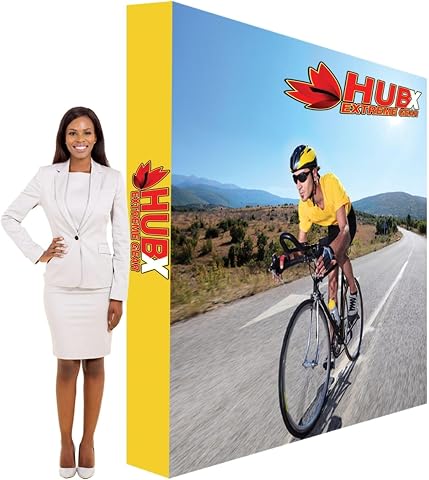
This lightweight 10×8 ft fabric pop-up display features a quick and easy setup, making it ideal for trade shows, events, and promotional use. The customizable backdrop allows for personalized branding with logos or designs, and the durable aluminum frame supports the fabric banner effectively.
Pros:
- Lightweight and easy to set up in 2 minutes
- Customizable with logos or designs for branding
- Reusable and portable for various events
Cons:
- May require additional accessories for full customization
- Limited to fabric backdrops, less suitable for heavy-duty use
- Designs may fade over time with frequent washing
Best for: Businesses that need a straight fabric backdrop for their booth.
Not ideal for: Teams with limited booth space or no way to transport a large display.
Bottom line: Confirm the venue fit, packed size, and artwork requirements before ordering this custom backdrop.
Branded tablecloth
A branded table covering can help make a registration, demo, or product table feel connected to the rest of your booth. The listed item is a personalized engraved keychain, however, so its name does not describe a tablecloth. Treat it as a possible attendee giveaway only if its customization, quantity, and intended use suit your plan; it does not fill the tablecloth slot as listed.
A frequent buying mistake is relying on a product title or assumed customization without checking the actual item details. Confirm what is being personalized, which text or logo can be added, and whether the listing describes one keychain or another format. If you need a tablecloth, measure the tabletop and decide whether you want a fitted or draped look before selecting a separate table covering. Check the tablecloth dimensions against table width, depth, and height, and confirm that any branding method and artwork placement are appropriate for the fabric. Keep the table setup practical: leave room for samples, cards, and a clear interaction area rather than allowing a giveaway or oversized covering to crowd the surface.
What to look for:
- Verify that the listing is for an engraved keychain, not a tablecloth.
- Confirm supported text, logo, and name personalization options.
- Check item quantity and intended use before planning giveaways.
- For a separate tablecloth, measure the table and compare coverage dimensions.
- Review branding placement and keep usable tabletop space in your layout.
Custom Keychain, Personalized Double-Sided Engraved Text/Logo/Name for Men

This personalized stainless steel keychain features laser-engraved text or logos on both sides, allowing you to customize with your contact information or message. It is durable, practical, and suitable for holding keys or decorating bags, making it an ideal gift for various occasions.
Pros:
- High-quality stainless steel with durable laser engraving
- Personalized with custom text or logos on both sides
- Practical size for keys and accessories
- Suitable as a meaningful gift for various occasions
Cons:
- Limited color options (only stainless steel)
- Engraving may fade over time if not cared for properly
Best for: A business considering a personalized keychain as an attendee item.
Not ideal for: Anyone specifically shopping for a branded tablecloth.
Bottom line: This pick is a personalized keychain, so source a separate tablecloth for the booth.
Business card holder
A card holder keeps business cards visible and accessible when visitors stop by your booth. The HIIMIEI acrylic holder is listed with four slots and four tiers, which may help organize cards on a shared counter. Check the holder’s footprint and height against the table area you have available, especially if the same surface will also hold samples or a sign.
One common mistake is assuming every card format will fit a holder based only on its slot count. Compare the holder’s opening dimensions with your printed cards, including any unusually thick stock or nonstandard shape. Consider how attendees will approach it: place it where cards are easy to take without blocking conversation or other materials. If multiple team members or campaigns use the booth, decide whether separate tiers will make the choices clearer or create unnecessary clutter. Confirm the acrylic holder’s cleaning and handling guidance, and pack it so it does not get scratched or damaged in transit. A quick tabletop layout before the event can reveal whether a four-tier display works with your other materials.
What to look for:
- Check the holder’s overall footprint and height against available table space.
- Compare slot openings with your business-card dimensions and thickness.
- Decide how cards will be divided across the four tiers.
- Position the holder for easy access without crowding samples or signage.
- Pack and handle the acrylic holder according to its care guidance.
HIIMIEI Acrylic Business Card Holder Desk, 4 Slot, 4 Tier
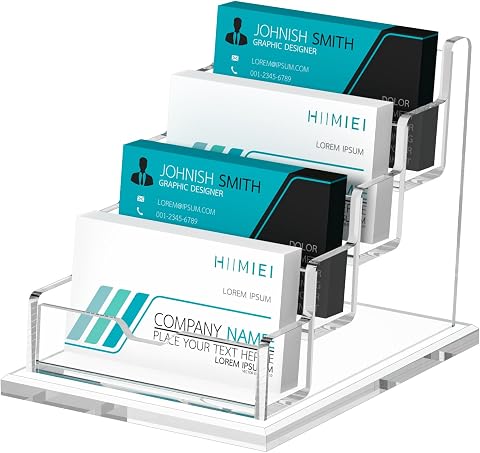
This acrylic business card holder features a professional and elegant design, suitable for organizing and displaying business cards in offices, reception areas, and retail spaces. Made of durable 4mm acrylic with a sturdy base, it can hold up to 60 standard-sized cards.
Pros:
- Elegant and professional appearance enhances business image
- Durable acrylic material resists breakage and deformation
- Large capacity for standard business cards
Cons:
- Limited to standard card size, not suitable for larger cards
- No lid or cover for protection against dust
- Design may be too basic for some aesthetic preferences
Best for: Booths that want several card slots in one acrylic holder.
Not ideal for: Teams using cards that do not fit the holder’s openings.
Bottom line: Measure your cards and table space to confirm this four-slot, four-tier holder fits the setup.
QR code sign holder
A sign holder can make a QR code or short call to action easier for booth visitors to see. This pick is a 24-pack of 5 by 7 inch gold acrylic holders, described as double-sided picture frames. The format may suit printed inserts, but check that the listing’s dimensions refer to the usable insert area and that the frame orientation works for your planned QR code.
Do not assume a picture frame automatically includes a QR code sign or that every print will scan through its surface. Print a high-contrast code at a size appropriate for the distance, test it on multiple phones, and make sure glare or reflections do not interfere. Confirm how the holder opens and whether signs can be replaced easily. A pack of 24 may be more than a single booth needs, so plan where each one would go before deciding how many to use. Place signs at a readable height near the relevant item or action, and include a brief written prompt for visitors who do not scan. Keep the scan path straightforward by checking the destination link and network access at the venue.
What to look for:
- Confirm the 5 by 7 inch measurement and usable insert area.
- Check frame orientation and how inserts are changed.
- Test printed QR codes through the holder on multiple phones.
- Check for glare and position signs at an easy viewing height.
- Plan placement and quantity for the 24 holders before setup.
24 Pack 5×7 Gold Acrylic Sign Holders, Double Sided Picture Frame Stands

These gold acrylic sign holders are perfect for displaying menus, signs, or photos at events, retail counters, or offices. Made from durable clear acrylic with a gold border, they feature double-sided viewing and are easy to slide in and out of the frame.
Pros:
- Elegant gold border adds a sophisticated look
- Double-sided display for versatile viewing
- Lightweight and portable for easy repositioning
- Sturdy construction with durable acrylic
Cons:
- Protective film must be peeled off before use
- Limited to 5×7 inch photos or signs
- Base may be less stable on uneven surfaces
Best for: Teams that need multiple small sign holders around a booth.
Not ideal for: Anyone expecting QR codes or printed signs to be included.
Bottom line: Use tested inserts and verify scan reliability through the holder before the show.
Portable label printer
A label printer can support booth preparation when your team needs to produce labels for shipping or event materials. The MUNBYN Bluetooth thermal printer is described as wireless and designed for 4 by 6 shipping labels. Check whether that label size and output type match your actual task; shipping labels may not be the right format for product names, sample details, or attendee follow-up materials.
Before relying on a Bluetooth printer at an event, verify device compatibility, supported operating systems, and the connection steps for the phones or computers your team will use. Confirm which labels and rolls are compatible, how they load, and whether the printer needs a power source during setup. A common mistake is assuming “wireless” means it can operate without power or that a label printer can print on ordinary paper. Review the intended use and prepare a small batch before traveling. If labels are essential to check-in or fulfillment, bring a backup plan and any needed supplies. Match the 4 by 6 format to your workflow so you do not discover at the booth that the labels are too large or the wrong type.
What to look for:
- Confirm the printer supports the devices and operating systems you plan to use.
- Check compatible 4 by 6 thermal labels and loading instructions.
- Verify power requirements for the event location.
- Test Bluetooth pairing and print a sample before travel.
- Make sure shipping-label output matches your intended booth workflow.
MUNBYN Bluetooth Thermal Label Printer, Wireless 4×6 Shipping Label Printer

The MUNBYN Bluetooth Thermal Label Printer offers wireless printing for various label sizes, including 4×6 shipping labels. It supports multiple label types and templates, making it suitable for shipping, branding, and organization tasks.
Pros:
- Wireless Bluetooth connectivity for easy printing from mobile devices and computers
- Supports a wide range of label sizes and templates for versatile use
- Simple 3-step setup with app and web options
Cons:
- May not be compatible with UPS thermal paper
- Requires genuine Munbyn thermal labels for optimal results
Best for: Teams that need wireless printing for compatible shipping labels.
Not ideal for: Businesses that need general paper printing or different label sizes.
Bottom line: Test device pairing and label compatibility before counting on this printer at the event.
Product sample bags
Sample bags give you a way to prepare take-home products or information for visitors. No specific product is listed for this slot, so choose bags around what you plan to distribute and how attendees will carry them. Start with the largest sample you expect to include, then check its dimensions against the bag’s usable interior space.
A frequent mistake is choosing bags that are too small, too flimsy, or inconvenient to carry once filled. Consider the combined size and weight of the contents, the style of closure, and whether the material suits the items being packed. For food, cosmetics, or other products with packaging requirements, follow the applicable product and venue guidance rather than assuming a general-purpose bag is appropriate. Decide whether branding is important and, if so, check print area, artwork setup, and whether the bag material supports the intended marking. Prepare a filled sample before ordering a batch and check that it closes securely and remains easy to hand out. Keep the contents consistent so visitors receive the same information or sample combination at your booth.
What to look for:
- Measure the largest item and confirm usable bag dimensions.
- Check material strength against the contents’ combined weight.
- Choose a closure that is easy to open and secure for transport.
- Verify material and packaging suitability for the products inside.
- Test a filled sample and confirm branding options if needed.
Set your buying order by what the booth needs to function: confirm the display and table dimensions first, then organize cards and visitor signs, and prepare labels or sample bags around your workflow. Check custom artwork and device compatibility before placing orders, and leave time to assemble or test each item.
A clear layout and a few well-chosen materials can make event preparation feel manageable. Use this checklist to work through one booth need at a time, verify the details that affect fit, and arrive ready to welcome visitors with confidence and clarity.
Fall Picks
fall essentials
As an affiliate, we earn on qualifying purchases.