
🔍 Read the full analysis: What Can You Make? 10 Best 3D Printers For Multicolor Projects In 2027 on ThorstenMeyerAI.com

Get business pricing on office and shipping supplies
- Business-only prices and quantity discounts
- Tax-exempt purchasing
- Multiple users, one account, clear invoices
TL;DR
A source article from ThorstenMeyerAI.com compares 10 printers for multicolor projects, naming the Bambu Lab P2S Combo its leading all-around package. The list spans enclosed printers, open-frame options, filament-switching bundles, a four-toolhead system and speed-focused models; the best fit depends on materials, workflow, setup and expected waste.
ThorstenMeyerAI.com has compared 10 3D printers for multicolor projects, ranking the Bambu Lab P2S Combo as its leading general-purpose choice because it pairs an enclosed printer with an included multicolor material system. The guide also covers open-frame hobby machines, standalone enclosed printers and a four-toolhead design, underscoring that buyers face different tradeoffs in material handling, setup and waste, as detailed in the original analysis.
The guide’s top recommendation is the P2S Combo, which the source describes as a well-rounded package for buyers who want an enclosure and multicolor hardware together, much like the options covered in this home 3D printer guide. Its other Bambu Lab picks distinguish between a standalone P1S, for buyers who want an enclosed printer without bundled multicolor equipment, and the P1S Combo, which adds an AMS system. The A1 and A1 Combo are positioned as more approachable options for hobbyists whose workspace and materials suit an open-frame printer.
The list also compares different ways of handling multiple colors. The Snapmaker U1 uses four toolheads, while other machines rely on filament-switching systems. The source includes the Adventurer 5M for its fast CoreXY design and the Anycubic Kobra X, Flashforge AD5X and Bambu Lab K2 Combo as other routes into multicolor printing. It does not provide a standardized test table or numerical performance results in the supplied material.
ThorstenMeyerAI.com says it weighed printer design, material handling, enclosure, setup, maintenance, versatility and whether multicolor hardware comes in the package. It cautions that advertised capability is not the same as practical value: buyers should account for print time and purge waste from frequent color changes, along with the extra work of maintaining a printer. The guide’s ranking favors broad usefulness, but it says a lower-ranked model may fit a specific buyer better.
The 10 picks
- 1
 Snapmaker U1 3D Printer with 4-Toolhead and 5-Second Tool ChangerView on Amazon →
- 2
 Bambu Lab P2S Combo – P2S 3D Printer with AMS 2 Pro (Multi‑Color)View on Amazon →
- 3
 Bambu Lab P1S Combo 3D Printer with AMS – Multi‑Color PrintingView on Amazon →
- 4
 Creality K2 Combo 3D Printer, Multicolor Printing, Max 600mm/s Speed, Auto Le…View on Amazon →
- 5
 Bambu Lab A1 Combo + LED Lamp Kit (with AMS Lite)View on Amazon →
- 6
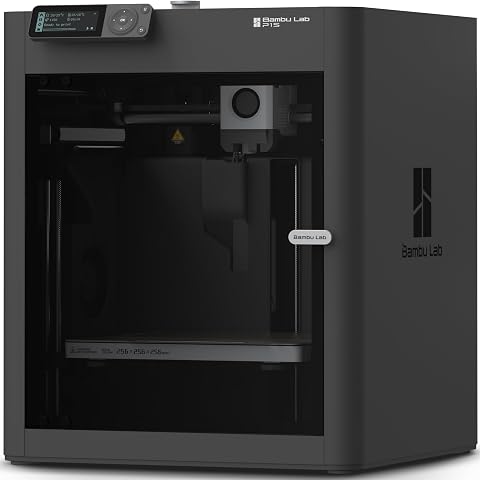 Bambu Lab P1S 3D PrinterView on Amazon →
- 7
 Anycubic Kobra X Multicolor 3D PrinterView on Amazon →
- 8
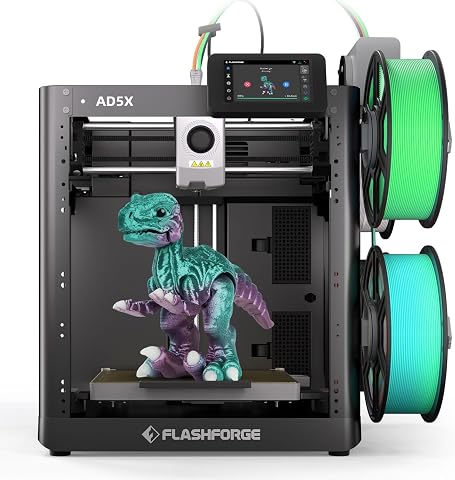 Flashforge AD5X Multi-Material 3D PrinterView on Amazon →
- 9
 Bambu Lab A1 FDM 3D PrinterView on Amazon →
- 10
 FLASHFORGE Adventurer 5M 3D Printer, All-Metal CoreXY, 600mm/s Max TravelView on Amazon →
Choosing a Printer Beyond Color Count
The comparison matters because multicolor printing is a workflow choice, not simply a feature to rank by the number of colors advertised. Filament-switching systems and multiple-toolhead machines handle changes differently, and that can affect setup, print duration and material use. Buyers producing labels or decorative pieces may value automated changes; people mostly making functional, single-color parts may get little benefit from paying for that complexity.
Enclosure and workspace needs also affect the decision. The source says an enclosure can help control drafts and temperature for some materials and larger prints, while open-frame machines can suit many everyday hobby projects. An enclosed model may take more room and require attention to ventilation. Speed figures alone do not settle the choice: print geometry, layer height, material and cooling all influence real-world duration and finish.
Popular right now

DREAME D20 Air Plus Robot Vacuum and Mop with Auto-Empty Dock

Breville BES870XL Barista Express Espresso Machine, Brushed Stainless Steel

Apple AirPods Pro (1st Generation) with MagSafe Charging Case
As an affiliate, we earn on qualifying purchases.
How the Guide Ranks Its Picks
The article is a buyer’s guide rather than a report of new product launches. Its stated approach is to compare machines by ownership factors and the type of maker each model suits, giving additional weight to whether a multicolor system is included. It separates enclosed CoreXY machines from open-frame printers instead of using headline speed as the sole yardstick.
The source also advises readers to measure both available bench space and intended model size. Large parts may be split and assembled, but that can add design work and leave seams to finish. Routine ownership can include cleaning the build surface, replacing consumables and clearing a nozzle; the supplied source excerpt cuts off during its maintenance discussion, so it does not provide a complete model-by-model maintenance assessment.
“The P2S Combo ranks first as the most complete general-purpose bundle in this group.”
— ThorstenMeyerAI.com buyer’s guide
Testing Data and Costs Not Supplied
The provided source material does not state the guide’s publication date, prices, complete specifications, print-test conditions or model-by-model scoring. It also does not establish a common benchmark for speed, print quality, noise, reliability or material waste. The rankings should therefore be read as the source’s editorial recommendations, not as independently verified test results.
Exact ownership costs remain unclear, including the price of bundled systems, replacement parts and filament consumed during color changes. The source also gives no detailed compatibility matrix for materials or a full maintenance comparison. Buyers should check current manufacturer specifications and pricing before purchasing, as product details and availability can change.
Check Specs Before Buying
The next step for buyers is to identify the materials and objects they expect to print, then compare enclosure needs, usable build volume, multicolor workflow and available workspace. Anyone weighing a Combo against a standalone model should verify exactly which material-handling hardware is included and whether it supports the intended workflow.
Before making a purchase, readers should consult current manufacturer listings for prices, compatibility, package contents and support terms. The source provides no future product announcement or testing milestone, so it is not clear whether the guide will be updated with hands-on measurements or revised rankings.
Key Questions
Which printer does the guide recommend overall?
ThorstenMeyerAI.com ranks the Bambu Lab P2S Combo first for general-purpose use, citing its enclosed printer and included multicolor material system. That ranking is the source’s assessment, not a standardized test result supplied in the excerpt.
What is the main difference between the P1S and P1S Combo?
The guide describes the P1S as a standalone enclosed printer without bundled multicolor hardware, while the P1S Combo adds an AMS system. Buyers should confirm current package contents before ordering.
Is the Snapmaker U1’s multicolor approach the same as filament switching?
No. The source identifies the U1 as a four-toolhead system and contrasts it with printers that switch filaments. It does not provide a detailed head-to-head test of waste, speed or upkeep.
Do multicolor printers use more material or take longer?
The guide warns that frequent color changes can add print time and purge waste, especially when several colors are used on a layer. The amount depends on the print and workflow; the supplied source gives no measured figures.
What should buyers check before choosing a printer?
Match the printer to expected materials, model size, workspace and how often you will print in multiple colors. Also compare enclosure, included hardware, maintenance and current pricing, rather than choosing on a maximum-speed figure alone.
Source: ThorstenMeyerAI.com