🔍 Read the full analysis: 12 AI Productivity Apps To Explore For More Efficient Work on ThorstenMeyerAI.com

Get business pricing on office and shipping supplies
- Business-only prices and quantity discounts
- Tax-exempt purchasing
- Multiple users, one account, clear invoices
TL;DR
A roundup from ThorstenMeyerAI.com presents 12 AI productivity apps and resources for tasks including meeting notes, writing and workflow planning. It names The Google Gemini AI Workspace as its broad workflow-oriented pick and Conference Notes App as a focused meeting option, while noting that the list also includes books and a directory. The rankings are editorial judgments, not evidence that the products deliver measured productivity gains.
ThorstenMeyerAI.com has published a 12-pick roundup of AI productivity apps and learning resources for writing, meeting notes, idea development and workflow automation, as detailed in the original analysis. The site names The Google Gemini AI Workspace as its leading workflow-oriented choice and Conference Notes App as its more focused option for meeting capture, but says the best fit depends on the task and how a tool fits existing work.
The 12 picks
- 1
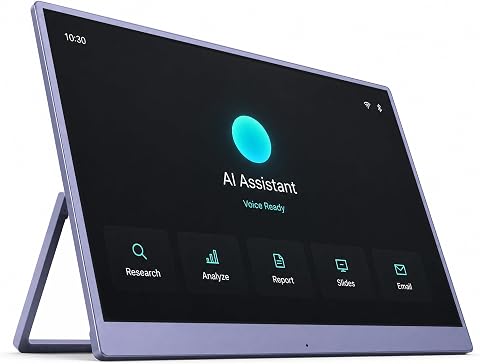 VAIMI AI Companion Hub with 15.6-Inch DisplayView on Amazon →
- 2
 The Complete Microsoft 365 and Copilot Handbook, Volume I: Core Apps and AI-E…View on Amazon →
- 3
 Aulax Smart AI Productivity, Writing, and Assistant AppView on Amazon →
- 4
 The Google Gemini AI Workspace: Build Smart AI Workflows, Automate Tasks, Cre…View on Amazon →
- 5
 The Complete Guide: The Ultimate Directory of 5,000+ Apps in 500+ Categories…View on Amazon →
- 6
 AI Writer Pro: Write SmartView on Amazon →
- 7
 SmartPrompt – AI Prompt Generator & EnhancerView on Amazon →
- 8
 AI NotebookView on Amazon →
- 9
 AIO AI ApexView on Amazon →
- 10
 GPT AI Chatbot: Chat, RPG Games, and AI AssistantView on Amazon →
- 11
 AI AssistantView on Amazon →
- 12
 Conference Notes AppView on Amazon →
The Google Gemini AI Workspace
The roundup ranks The Google Gemini AI Workspace first for readers looking to connect AI assistance with practical workflows in Google Workspace. Its stated appeal is the emphasis on building a personal system rather than treating AI as a standalone chat feature. This is the publisher’s editorial assessment; the source material does not provide comparative performance testing or measured time savings. For a student-focused perspective on AI tools, see AI apps for students.
Popular right now

TCL 55 T7 Series 4K 120Hz QLED Smart Google TV (55T7)

Dyson V8 Cyclone Cordless Vacuum

KitchenAid Artisan 5-Quart Tilt-Head Stand Mixer, Almond Cream
As an affiliate, we earn on qualifying purchases.
Conference Notes App
Conference Notes App is presented as the most task-specific selection, aimed at people who regularly capture meeting notes. The source does not spell out particular features or describe a product test, so its suitability should be read as a recommendation based on the app’s stated meeting focus.
AI Writer Pro
AI Writer Pro is aimed at people whose main work bottleneck is drafting. The roundup distinguishes it from prompt-focused tools: a writing app targets producing text, while a prompt tool helps shape instructions given to an AI system. Readers still need to review accuracy, tone and completeness.
SmartPrompt
SmartPrompt is described as a way to improve the instructions used to generate AI output. That places it earlier in the work process than a drafting tool: better prompts may help users guide results, but the source does not establish that it consistently improves them or reduces editing time.
Automation directory
The roundup includes an automation directory for readers exploring workflow options. Unlike a hands-on app, a directory is a reference resource: users must assess the listed options and implement any workflow themselves. The provided source does not specify the directory’s contents or coverage.
Gemini handbook
A Gemini handbook appears among the 12 picks as a learning resource. It may help readers plan how to use Gemini, but it is not software that performs work on its own. The source does not provide the title, edition or details of the handbook’s material. For another productivity aid, explore E Ink tablets for work tasks.
Microsoft 365 handbook
The Microsoft 365 handbook is another guide rather than an app. It is included for readers seeking help building skills around Microsoft 365 workflows. Its value depends on applying the guidance to a person’s own setup; the source does not describe specific lessons or tested outcomes.
Other picks in the roundup
The supplied source identifies a total of 12 selections, but names only the products and resources detailed above. It describes the remaining options generally as broad assistants or companion products, without giving their individual names or specific capabilities. Naming or assigning features to those entries would go beyond the available information.
Choosing by writing needs
For a writing bottleneck, the roundup points readers toward AI Writer Pro; for improving instructions, it points to SmartPrompt. The practical difference is the stage of work each is meant to support. A trial using a real draft can show whether the output needs so much correction that the tool adds little value.
Choosing by meeting needs
People who repeatedly turn meetings into records may prefer the focused Conference Notes App over a general assistant, according to the roundup. The source advises checking names, decisions and action items rather than assuming generated notes are ready to share. It does not report accuracy results for the app.
Choosing by workflow needs
Readers who want to connect AI with recurring processes may find the Google-focused workflow pick or the learning resources more relevant. A guide can help with planning, but still requires implementation. The roundup says its order reflects usefulness across common needs, not a claim that one choice works for everyone.
Choosing a broad assistant
General-purpose assistants can serve multiple tasks, but the source says their value depends on establishing clear workflows. A broad product may require users to create prompts and routines before it becomes useful. Someone seeking a single defined outcome may find a focused writing, meeting or notebook tool easier to adopt.
Testing before adopting
The roundup recommends trying a tool on a real, recurring task and evaluating the full process, including checking and cleanup. Readers should also consider where their documents and notes already live, how results can be retrieved, and whether they can submit sensitive information under workplace rules. The source provides no pricing, privacy terms or independent product comparisons.
Matching AI Tools to Daily Work
The selection highlights a practical distinction for workers weighing AI products: more functions do not automatically mean better fit. A focused app may be easier to use for one repeated task, while a broad assistant may require setup and continued maintenance. The inclusion of handbooks and a directory also separates tools that assist directly with work from resources that teach users how to build a process.
That distinction matters because a quick generated response does not equal time saved. Users still need to check facts, restore their preferred voice, or correct meeting records. The roundup offers a way to organize choices by task, but it does not establish that any pick has delivered a particular productivity gain.
How the Picks Were Ranked
ThorstenMeyerAI.com says it ranked the selections by how clearly they support a repeatable productivity task, the practical direction they offer buyers, and whether their scope matches the work they claim to support. It gave more weight to defined uses such as writing, meeting notes and workflow building than to broadly named assistants with less clearly specified roles.
The publisher also says it considered setup demands and overlap with existing software, and treated books and directories separately from working apps. It characterizes the ranking as editorial guidance rather than a universal verdict. The supplied material gives no publication date, product testing methodology, pricing or independent measurements.
“The right choice depends on which work you want to improve.”
— ThorstenMeyerAI.com
Limits of the Product Details
The source material does not provide the names or descriptions of all 12 selections; it identifies several picks and refers to other options only in general terms. It also does not include prices, publication timing, privacy policies, product testing results or measured productivity outcomes. Readers should verify current features and data practices with providers before adopting a product, particularly for confidential work. The roundup’s rankings are attributed editorial judgments, not independently confirmed performance findings.
Trial a Tool on Real Work
The next step for readers is to choose one recurring task and compare a candidate tool against their usual process. Use a real, low-risk draft, meeting record or workflow, then account for setup, corrections and time spent checking the result. Before submitting work information, review the provider’s data terms and follow any workplace requirements. The source does not announce product launches or a follow-up test, so whether the picks save time in practice remains for individual users to establish.
Key Questions
What is the roundup’s top pick?
ThorstenMeyerAI.com names The Google Gemini AI Workspace as its leading workflow-oriented choice. That is the publisher’s ranking, not an independently measured performance result.
Which selection is focused on meeting notes?
The roundup describes Conference Notes App as its task-specific meeting capture option. The source does not provide accuracy testing or detailed feature information.
Are all 12 selections software apps?
No. The roundup includes learning resources, including a Gemini handbook, a Microsoft 365 handbook and an automation directory. These can guide users but do not perform tasks like software.
How should readers choose an AI productivity tool?
Start with a recurring task, try a candidate on real work, and judge the finished result after corrections and review. Also check setup needs, compatibility with existing tools and the provider’s data terms.
Does the article prove that these tools save time?
No. The source describes an editorial ranking and selection criteria but provides no measured time savings or comparative test results. Users would need to evaluate the tools against their own workflows.
Source: ThorstenMeyerAI.com