A tri band gaming router offers the capacity to handle multiple high-bandwidth devices simultaneously, making it ideal for serious gamers and busy households. The best models deliver fast, stable connections with dedicated bands for gaming, streaming, and smart home devices. The main tradeoffs often involve price, complexity, and whether extra bands truly translate into better performance for your setup. Comparing features like Wi-Fi standards, ports, and security options can be overwhelming. Continue reading for a curated list of the top tri band routers and what makes each stand out.

Get business pricing on office and shipping supplies
- Business-only prices and quantity discounts
- Tax-exempt purchasing
- Multiple users, one account, clear invoices
Key Takeaways
- The top routers balance high throughput with advanced security features and multiple ports for customization.
- Most premium options incorporate Wi-Fi 7, but Wi-Fi 6E remains a strong choice for cost-effective performance.
- Price differences often relate to added features like 10G ports, mesh compatibility, and built-in security.
- Tri band routers with dedicated 5GHz and 6GHz bands tend to offer the best gaming experiences, but setup can be complex.
- Not all tri band routers are equally future-proof; newer Wi-Fi standards and mesh options are key considerations.
| TP-Link AXE5400 Tri-Band WiFi 6E Router (Archer AXE75) |  | Best Overall Tri-Band WiFi 6E Router | WiFi Speed: up to 5400 Mbps | Bands: Tri-Band (6 GHz, 5 GHz, 2.4 GHz) | 6 GHz Band Speed: 2402 Mbps | VIEW ON AMAZON | See Our Full Breakdown |
| TP-Link Tri-Band AXE5400 Wi-Fi 6E Gaming Router Archer GXE75 |  | Best for Heavy Gaming and Customization | Wi-Fi Speed: up to 5.4 Gbps | Bands: Tri-Band (6 GHz, 5 GHz, 2.4 GHz) | Ports: 1×2.5G Ethernet, 4×1G Ethernet, USB 3.0 | VIEW ON AMAZON | See Our Full Breakdown |
| TP-Link Deco 7 Pro BE63 Tri-Band WiFi 7 Mesh System (2-Pack) |  | Best for Whole-Home WiFi Coverage | WiFi Standard: WiFi 7 | Coverage: 5800 sq.ft. | Max Speed: 5188 Mbps (6 GHz), 4324 Mbps (5 GHz), 574 Mbps (2.4 GHz) | VIEW ON AMAZON | See Our Full Breakdown |
| GL.iNet GL-BE9300 Flint 3 Tri-Band Wi-Fi 7 Router |  | Best for Ultra-High Speeds and Advanced Security | Wi-Fi Standard: Wi-Fi 7 | Wireless Speed: up to 9 Gbps | Bands: Tri-band including 6GHz | VIEW ON AMAZON | See Our Full Breakdown |
| ASUS ROG Strix GS-BE12000 WiFi 7 Gaming Router – Tri-Band, 12Gbps, Mesh |  | Best for High-End Gaming and Network Performance | Wi-Fi Standard: WiFi 7 | Max Throughput: 12 Gbps | Bands: Tri-Band | VIEW ON AMAZON | See Our Full Breakdown |
| TP-LINK Archer AX11000 Wi-Fi 6 Tri-Band Gaming Router |  | Best Overall for High-Performance Gaming and Heavy Network Use | Product Dimensions: 14.37 x 11.42 x 4.72 inches | Item Weight: 2.61 pounds | Supports Wi-Fi 6: Yes | VIEW ON AMAZON | See Our Full Breakdown |
| TP-Link Tri-Band WiFi 7 Router (Archer BE600) with 10G Port and HomeShield Security |  | Best for Large Homes with Future-Proof WiFi 7 Support | WiFi Technology: WiFi 7 | Max Speed: 5,765 Mbps | Coverage: Up to 2,600 sq. ft. | VIEW ON AMAZON | See Our Full Breakdown |
| NETGEAR Nighthawk WiFi 7 Router (BE9300) |  | Best for Speed and High-Demand Multi-Device Networks | Wireless Speed: 9.3Gbps | WiFi Bands: Tri-band including 6 GHz | Coverage: 2,500 sq. ft. | VIEW ON AMAZON | See Our Full Breakdown |
| TP-Link Archer BE550 Pro WiFi 7 Tri-Band Router |  | Best for Advanced Users Seeking Peak Speeds and Features | WiFi Speed: up to 9.7Gbps | Bands: Tri-band (2.4GHz, 5GHz, 6GHz) | Ports: 1x 10G WAN, 4x 2.5G LAN, USB 3.0 | VIEW ON AMAZON | See Our Full Breakdown |
| MSI Radix AXE6600 WiFi 6E Tri-Band Gaming Router |  | Best for Gaming with Customizable RGB and AI QoS | WiFi Bands: 2.4GHz, 5GHz, 6GHz | WiFi Standard: WiFi 6E | Max Speed: 6.6Gbps | VIEW ON AMAZON | See Our Full Breakdown |
| TP-Link Archer BE12000 Tri-Band Wi-Fi 7 Router with 6GHz Band and 10G Connectivity |  | Best Overall for Large Homes and Power Users | Model: Archer BE12000 | Wi-Fi Bands: Tri-Band (6 GHz, 5 GHz, 2.4 GHz) | Max Speed: Up to 5,765 Mbps (6 GHz), 5,765 Mbps (5 GHz), 688 Mbps (2.4 GHz) | VIEW ON AMAZON | See Our Full Breakdown |
| TP-Link Tri-Band WiFi 7 Router (Archer BE550) – 6-Stream, 2.5G Ports, Mesh Expansion |  | Best for Seamless Whole-Home Performance | WiFi Standard: WiFi 7 | Speed: up to 5760 Mbps | Bands: Tri-band | VIEW ON AMAZON | See Our Full Breakdown |
| TP-Link Tri-Band BE11000 Wi-Fi 7 Gaming Router Archer GE650 | 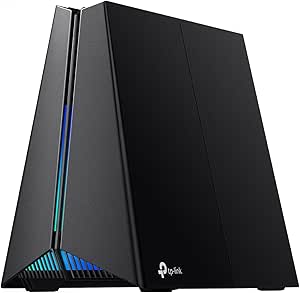 | Best for High-Speed Gaming and Creative Streaming | Wi-Fi Standard: Wi-Fi 7 | Speed: over 10 Gbps | Bands: Tri-band (6 GHz, 5 GHz, 2.4 GHz) | VIEW ON AMAZON | See Our Full Breakdown |
| TP-Link Tri-Band WiFi 7 Router Archer BE700 | | Best for Demanding Home Networks and 4K/8K Streaming | WiFi Standard: WiFi 7 | Speed: up to 15 Gbps | Bands: Tri-band | VIEW ON AMAZON | See Our Full Breakdown |
| tri band gaming router | Ports | Bands | Coverage | Security |
|---|---|---|---|---|
| TP-Link AXE5400 Tri-Band WiFi | 1 2.5Gbps WAN port | Tri-Band (6 GHz, 5 GHz, 2.4 GHz) | — | — |
| TP-Link Tri-Band AXE5400 Wi-Fi | 1×2.5G Ethernet, 4×1G Ethernet, USB 3.0 | Tri-Band (6 GHz, 5 GHz, 2.4 GHz) | — | WPA3, DoS protection, SPI firewall |
| TP-Link Deco 7 Pro BE63 Tri-Ba | 4x 2.5G WAN/LAN, 1x USB 3.0 | — | 5800 sq.ft. | — |
| GL.iNet GL-BE9300 Flint 3 Tri- | — | Tri-band including 6GHz | up to 2000 sq ft | — |
| ASUS ROG Strix GS-BE12000 WiFi | — | Tri-Band | — | — |
| TP-LINK Archer AX11000 Wi-Fi 6 | — | — | — | — |
| TP-Link Tri-Band WiFi 7 Router | 1x 10 Gbps WAN, 1x 2.5 Gbps WAN/LAN, 3x 2.5 Gbps LAN | — | Up to 2,600 sq. ft. | HomeShield Security |
| NETGEAR Nighthawk WiFi 7 Route | — | — | 2,500 sq. ft. | — |
| TP-Link Archer BE550 Pro WiFi | 1x 10G WAN, 4x 2.5G LAN, USB 3.0 | Tri-band (2.4GHz, 5GHz, 6GHz) | Up to 2,000 sq ft | WPA3 |
| MSI Radix AXE6600 WiFi 6E Tri- | — | — | — | — |
| TP-Link Archer BE12000 Tri-Ban | 10 Gbps WAN/LAN, 2.5 Gbps WAN/LAN, three 1 Gbps LAN, USB 3.0 | — | Up to 3,000 sq. ft. | TP-Link HomeShield, WPA3 |
| TP-Link Tri-Band WiFi 7 Router | 1x 2.5G WAN, 4x 2.5G LAN | Tri-band | Up to 2,000 sq. ft. | WPA3, TP-Link HomeShield |
| TP-Link Tri-Band BE11000 Wi-Fi | 2×5G WAN/LAN, 3×2.5G LAN | Tri-band (6 GHz, 5 GHz, 2.4 GHz) | — | HomeShield, DoS protection, firewall |
| TP-Link Tri-Band WiFi 7 Router | 1×10G WAN, 1×2.5G LAN, 3×1G LAN | Tri-band | Extensive, suitable for demanding households | TP-Link HomeShield |
More Details on Our Top Picks
TP-Link AXE5400 Tri-Band WiFi 6E Router (Archer AXE75)
The TP-Link Archer AXE75 stands out for delivering high-speed tri-band WiFi with dedicated 6 GHz support, making it ideal for low-latency gaming and streaming. Compared with the ASUS ROG GS-BE12000, this model offers a more straightforward setup and balanced feature set for most users, though it lacks the raw throughput of the more premium router. Its support for OneMesh and WPA3 security enhances coverage and security, but it relies on an existing modem and may be complex for casual users. Overall, this pick is perfect for those seeking reliable, fast WiFi with future-proof 6 GHz support without overcomplicating their setup.Pros:- High-speed tri-band WiFi with dedicated 6 GHz for low latency
- Supports seamless coverage with OneMesh technology
- Strong security features including WPA3 and VPN support
Cons:- Requires a separate modem for most ISPs
- Advanced features may be overwhelming for casual users
Best for: Tech-savvy households wanting robust, future-proof WiFi coverage with low latency for gaming and streaming
Not ideal for: Casual internet users or small apartments who don’t need WiFi 6E’s advanced features and find setup complicated
- WiFi Speed:up to 5400 Mbps
- Bands:Tri-Band (6 GHz, 5 GHz, 2.4 GHz)
- 6 GHz Band Speed:2402 Mbps
- CPU:1.0 GHz dual-core
- Memory:512 MB
- Ports:1 2.5Gbps WAN port
Our verdict“This router is best suited for users who want high-performance WiFi with the latest 6 GHz band and are comfortable with complex features.”
TP-Link Tri-Band AXE5400 Wi-Fi 6E Gaming Router Archer GXE75
The Archer GXE75 is designed for gamers demanding the highest speeds and lowest latency, offering up to 5.4 Gbps across tri-bands, with dedicated gaming acceleration features. Unlike the AXE75, it provides a 2.5G Ethernet port and multiple wired options, catering to those who prioritize wired connections for gaming stability. Its quad-core CPU and extensive port selection make it suitable for complex network setups but can be intimidating for non-technical users. While it’s more expensive, this router excels for users who need maximum performance and customization for gaming and multiple device connectivity.Pros:- High-speed tri-band WiFi with dedicated gaming acceleration
- Multiple ports including 2.5G Ethernet and USB 3.0
- Advanced security with WPA3, DoS protection, and firewall
Cons:- Setup can be complex for non-technical users
- Size may require significant space and placement planning
Best for: Hardcore gamers and power users seeking ultra-fast speeds and extensive wired options
Not ideal for: Casual users or small households with simple internet needs, due to its complexity and price
- Wi-Fi Speed:up to 5.4 Gbps
- Bands:Tri-Band (6 GHz, 5 GHz, 2.4 GHz)
- Ports:1×2.5G Ethernet, 4×1G Ethernet, USB 3.0
- Processor:Quad-core CPU
- Maximum Devices:100
- Security:WPA3, DoS protection, SPI firewall
Our verdict“This router is ideal for gamers and tech enthusiasts who prioritize raw speed and wired flexibility over simplicity.”
TP-Link Deco 7 Pro BE63 Tri-Band WiFi 7 Mesh System (2-Pack)
The Deco 7 Pro BE63 offers extensive coverage with two units supporting WiFi 7, making it suitable for large homes up to 5800 sq.ft. Unlike the AXE75, which is a single-router solution, this mesh system excels at maintaining seamless coverage across multiple floors and rooms, ideal for streaming, gaming, and smart devices. Its high-speed backhaul ports support high-bandwidth wired connections, but setup can be more involved for beginners. While not as focused on gaming performance, its AI-driven roaming and wide compatibility make it a versatile choice for whole-home connectivity, especially for households with many devices.Pros:- Supports WiFi 7 for future-proof, fast speeds
- Large coverage area up to 5800 sq.ft.
- Supports over 200 devices simultaneously
Cons:- Requires a separate modem for internet
- Setup can be complex for non-technical users
Best for: Large households needing reliable, fast WiFi coverage across extensive spaces
Not ideal for: Small apartments or users seeking a single-router setup with minimal complexity
- WiFi Standard:WiFi 7
- Coverage:5800 sq.ft.
- Max Speed:5188 Mbps (6 GHz), 4324 Mbps (5 GHz), 574 Mbps (2.4 GHz)
- Ports:4x 2.5G WAN/LAN, 1x USB 3.0
- Number of Units:2
- Supports:AI-Roaming, VPN, HomeShield
Our verdict“This mesh system is perfect for users wanting reliable, seamless WiFi over large areas, accepting a higher price and setup effort.”
GL.iNet GL-BE9300 Flint 3 Tri-Band Wi-Fi 7 Router
The GL.iNet Flint 3 offers exceptional speeds up to 9 Gbps, making it suitable for 8K streaming, intense gaming, and large-scale video calls. Its tri-band WiFi 7 support and advanced features like OFDMA and MLO set it apart from typical consumer routers like the AXE75, especially for users who need maximum throughput and security. However, it requires firmware updates for optimal performance and has a steeper learning curve for setup. This router suits users who need cutting-edge speed and security for demanding applications and large device counts but may be overkill for smaller households with basic needs.Pros:- Ultra-fast Wi-Fi 7 speeds supporting 9 Gbps
- Supports extensive device connections with stable performance
- Advanced security features including VPN and AdGuard
Cons:- Requires firmware update for optimal operation
- Setup can be complex for non-technical users
Best for: Tech-savvy users demanding maximum speed, security, and device capacity for streaming and gaming
Not ideal for: Less experienced users or small households with modest internet needs due to setup complexity
- Wi-Fi Standard:Wi-Fi 7
- Wireless Speed:up to 9 Gbps
- Bands:Tri-band including 6GHz
- Coverage:up to 2000 sq ft
- Memory:DDR4 1GB / eMMC 8GB
- Ethernet Ports:5 x 2.5G
Our verdict“This router is best for users who need the fastest WiFi speeds and robust security for high-demand applications.”
ASUS ROG Strix GS-BE12000 WiFi 7 Gaming Router – Tri-Band, 12Gbps, Mesh
The ASUS ROG Strix GS-BE12000 supports WiFi 7 with a staggering 12 Gbps maximum throughput, surpassing both the AXE75 and GXE75 in raw speed. Its extensive wired ports, including 7x 2.5G LAN, and a powerful quad-core CPU make it ideal for gaming, streaming, and smart home integration. Compared to the GXE75, it offers even greater coverage, but its high price and complexity can be barriers for casual users. This router is tailored for users who demand ultimate gaming performance, extensive wired connectivity, and advanced security, with setup requiring some technical know-how.Pros:- Supports WiFi 7 with 12 Gbps throughput
- Extensive wired network with 7 2.5G LAN ports
- Advanced security with AiProtection Pro
Cons:- High price point
- Setup can be complex for non-technical users
Best for: Gamer enthusiasts and tech aficionados seeking maximum throughput and coverage
Not ideal for: Average users or households with limited technical experience due to setup and cost
- Wi-Fi Standard:WiFi 7
- Max Throughput:12 Gbps
- Bands:Tri-Band
- Range:3000 sq. ft.
- Wired Ports:1 2.5G WAN, 7 2.5G LAN
- Processor:Quad-core 2.0GHz
Our verdict“This router is best for users who want the fastest possible WiFi and maximum wired connections, accepting cost and complexity.”
TP-LINK Archer AX11000 Wi-Fi 6 Tri-Band Gaming Router
The TP-LINK Archer AX11000 stands out for its support of Wi-Fi 6, making it a strong choice for gamers and demanding households. Compared to the newer WiFi 7 options like the TP-Link Archer BE600, it offers slightly lower maximum speeds but excels in stability with a proven Wi-Fi 6 standard. Its tri-band design helps distribute network load, reducing lag during intense gaming sessions. However, the large size and complex setup may challenge less tech-savvy users, and its premium price reflects its high-end features. This router makes the most sense for those who prioritize reliable, high-speed Wi-Fi without necessarily needing the latest WiFi 7 technology.
Pros:- Supports Wi-Fi 6 for fast, reliable wireless speeds
- Tri-band design reduces network congestion during heavy usage
- Gigabit Ethernet ports support high-speed wired connections
Cons:- Size may require ample space on desks or shelves
- Higher price compared to basic routers
- Setup can be complex for non-technical users
Best for: Gamers and power users who want a reliable, high-performance Wi-Fi 6 setup
Not ideal for: Users seeking the latest WiFi 7 speeds or a compact, easy-to-install router
- Product Dimensions:14.37 x 11.42 x 4.72 inches
- Item Weight:2.61 pounds
- Supports Wi-Fi 6:Yes
- Tri-band:Yes
- Gigabit Ethernet ports:Yes
Our verdict“This router is ideal for serious gamers and households demanding rock-solid Wi-Fi 6 performance.”
TP-Link Tri-Band WiFi 7 Router (Archer BE600) with 10G Port and HomeShield Security
The TP-Link Archer BE600 offers cutting-edge WiFi 7 technology, supporting speeds up to 5,765 Mbps on the 6 GHz band, making it perfect for users with large homes and many devices. Compared with the NETGEAR Nighthawk BE9300, it provides more advanced security and a broader coverage area, though it comes at a higher price point. Its multi-gig ports and easy setup via app appeal to tech-savvy users seeking future-proof performance. However, to fully utilize its speed, compatible WiFi 7 devices are necessary, and the complex features may overwhelm casual users. This router is best suited for those planning to upgrade their entire network with the latest WiFi 7 devices.
Pros:- Supports WiFi 7 with multi-gig ports for high throughput
- Wide coverage up to 2,600 sq. ft.
- Advanced HomeShield security and VPN support
Cons:- Premium price might be prohibitive for some
- Features can be overwhelming for non-technical users
- Requires WiFi 7-compatible devices for full speed
Best for: Homeowners with large spaces and tech enthusiasts eager to adopt WiFi 7
Not ideal for: Casual users or those with smaller homes who don’t need ultra-high speeds
- WiFi Technology:WiFi 7
- Max Speed:5,765 Mbps
- Coverage:Up to 2,600 sq. ft.
- Ports:1x 10 Gbps WAN, 1x 2.5 Gbps WAN/LAN, 3x 2.5 Gbps LAN
- Antennas:6
- Security:HomeShield Security
Our verdict“This router makes sense for users eager to future-proof their network with the latest WiFi 7 technology and extensive security features.”
NETGEAR Nighthawk WiFi 7 Router (BE9300)
The NETGEAR Nighthawk BE9300 delivers impressive speeds up to 9.3Gbps and broad coverage, making it ideal for high-demand activities like gaming, streaming, and smart home integration. Compared with the TP-Link Archer BE600, it offers higher maximum throughput but requires an additional modem, which adds to the setup complexity. Its robust security features and support for up to 100 devices suit busy households with multiple connected devices. The limited compatibility outside the U.S. and the need for a separate modem are notable downsides. This router fits well for those wanting top-tier WiFi 7 speeds and wide coverage, provided they’re comfortable with additional equipment.
Pros:- Fast WiFi 7 speeds up to 9.3Gbps for demanding tasks
- Supports coverage of 2,500 sq. ft.
- Multiple high-speed wired ports and security features
Cons:- Requires a separate modem, increasing setup complexity
- Limited to U.S. market compatibility
- Additional equipment needed for internet access
Best for: Power users with demanding networks needing maximum speeds and extensive coverage
Not ideal for: Users seeking an all-in-one solution or in regions outside the U.S.
- Wireless Speed:9.3Gbps
- WiFi Bands:Tri-band including 6 GHz
- Coverage:2,500 sq. ft.
- Internet Port:2.5 Gbps
- Dimensions:9.8 x 5.9 x 4 inches
- Supported Devices:up to 100
Our verdict“This router is perfect for speed-focused users with demanding networks who can manage extra equipment and regional limitations.”
TP-Link Archer BE550 Pro WiFi 7 Tri-Band Router
The TP-Link Archer BE550 Pro offers exceptional tri-band WiFi 7 speeds up to 9.7Gbps, with advanced features like Multi-Link Operation, OFDMA, and MU-MIMO, making it suitable for demanding smart homes and gamers. Compared with the MSI Radix AXE6600, it provides higher speeds and more ports, including a 10G WAN port. Its extensive coverage, security with WPA3, and multiple high-speed ports are big advantages, but the complex setup process and higher price may deter casual users. To fully benefit from its capabilities, compatible WiFi 7 devices are necessary. This pick is best for users who want cutting-edge performance and are comfortable with technical setup.
Pros:- High WiFi 7 speeds up to 9.7Gbps for demanding applications
- Multiple ports including 10G WAN and USB 3.0
- Advanced security with WPA3 and extensive coverage
Cons:- Setup can be challenging for non-technical users
- Higher cost compared to WiFi 6 routers
- Requires compatible devices to reach full speed
Best for: Tech-savvy users and smart home enthusiasts who need maximum speed and connectivity options
Not ideal for: Less experienced users or those with simpler network needs
- WiFi Speed:up to 9.7Gbps
- Bands:Tri-band (2.4GHz, 5GHz, 6GHz)
- Ports:1x 10G WAN, 4x 2.5G LAN, USB 3.0
- Coverage:Up to 2,000 sq ft
- Antennas:6 internal
- Security:WPA3
Our verdict“This router is best suited for advanced users seeking maximum speed, extensive port options, and future-proof features.”
MSI Radix AXE6600 WiFi 6E Tri-Band Gaming Router
The MSI Radix AXE6600 combines WiFi 6E support with gaming-centric features like AI QoS and customizable RGB lighting. Its 6.6Gbps speed across tri-bands and 8 streams ensure reliable connections for gaming and streaming alike. Compared to the TP-LINK Archer AX11000, it offers newer WiFi 6E support and more gaming-specific aesthetics, but its setup can be intimidating for beginners and comes at a higher price. The powerful 1.8GHz quad-core processor helps maintain low latency during intense gaming. While the RGB lighting adds a flair, it may not be necessary for all users, and the premium cost could be a barrier. This router is ideal for gamers who want performance with style and advanced management features.
Pros:- Supports WiFi 6E with tri-band for optimal gaming performance
- Powerful 1.8GHz quad-core processor ensures low latency
- Customizable RGB lighting enhances gaming aesthetics
Cons:- Setup can be complex for non-technical users
- Premium price point for advanced features
- RGB lighting may be unnecessary for some
Best for: Dedicated gamers and enthusiasts seeking high-speed WiFi 6E with gaming customization
Not ideal for: Users with simple networks or those who prefer plug-and-play simplicity
- WiFi Bands:2.4GHz, 5GHz, 6GHz
- WiFi Standard:WiFi 6E
- Max Speed:6.6Gbps
- Streams:8
- Processor:1.8 GHz quad-core
- Features:AI QoS, RGB Mystic Light, Game Accelerator
Our verdict“This router is perfect for gamers who want high-speed WiFi 6E and a customizable gaming look, provided they’re comfortable with setup complexity.”
TP-Link Archer BE12000 Tri-Band Wi-Fi 7 Router with 6GHz Band and 10G Connectivity
The Archer BE12000 stands out for its comprehensive Wi-Fi 7 support, combining the latest 6GHz band with high-speed tri-band performance. Compared to the Archer BE700, it offers a broader coverage area, making it ideal for large homes, but its complexity and premium price might be overkill for smaller setups. Its multiple high-speed ports and extensive coverage ensure smooth gaming, streaming, and smart home integration. However, it requires a separate modem and might intimidate less technical users. This router is perfect for those who need robust, future-proof connectivity across a large residence and are willing to invest in top-tier features.
Pros:- Supports the latest Wi-Fi 7 with ultra-fast tri-band speeds
- Includes multiple high-speed ports, ideal for fiber connections
- Provides extensive coverage up to 3,000 sq. ft.
Cons:- Requires a separate modem for internet access
- Can be complex to configure for non-technical users
Best for: Large households with demanding bandwidth needs and advanced network setups
Not ideal for: Users with small apartments or minimal internet demands, as its size and cost may be unnecessary
- Model:Archer BE12000
- Wi-Fi Bands:Tri-Band (6 GHz, 5 GHz, 2.4 GHz)
- Max Speed:Up to 5,765 Mbps (6 GHz), 5,765 Mbps (5 GHz), 688 Mbps (2.4 GHz)
- Ports:10 Gbps WAN/LAN, 2.5 Gbps WAN/LAN, three 1 Gbps LAN, USB 3.0
- Coverage:Up to 3,000 sq. ft.
- Antennas:6 high-gain antennas
- Compatibility:Alexa, Google Assistant
- Security:TP-Link HomeShield, WPA3
- Setup:Via TP-Link Tether App
Our verdict“This router is suited for tech-savvy users seeking maximum coverage and future-proof features in large homes.”
TP-Link Tri-Band WiFi 7 Router (Archer BE550) – 6-Stream, 2.5G Ports, Mesh Expansion
The Archer BE550 excels in delivering high-speed tri-band WiFi 7, making it a solid choice for active households that stream and game across multiple devices. Compared with the BE12000, it offers easier setup and Mesh support, making it more adaptable for expanding coverage. Its 6-stream configuration provides excellent throughput, but its coverage area of 2,000 sq. ft. may fall short for very large homes. The full 2.5G ports and security features like WPA3 make it suitable for future-proof wired and wireless connections. On the downside, advanced features might be overwhelming for less tech-savvy users, and its size could be an issue in small spaces. This model makes the most sense for users seeking high performance with simple expansion options.
Pros:- High-speed WiFi 7 with 6-stream performance
- Full 2.5G ports support future-proof wired connections
- Supports EasyMesh for seamless home expansion
Cons:- Requires a modem for most internet providers
- Complex features may intimidate casual users
Best for: Tech-savvy households wanting reliable, expandable WiFi coverage
Not ideal for: Small apartment dwellers who don’t need extensive coverage or advanced features
- WiFi Standard:WiFi 7
- Speed:up to 5760 Mbps
- Bands:Tri-band
- Number of Streams:6-Stream
- Ports:1x 2.5G WAN, 4x 2.5G LAN
- Coverage:Up to 2,000 sq. ft.
- Antennas:6 internal antennas
- Security:WPA3, TP-Link HomeShield
- Compatibility:Works with Alexa, Google Assistant, all WiFi generations
Our verdict“Ideal for tech-forward users seeking reliable, expandable WiFi with strong speeds and security.”
TP-Link Tri-Band BE11000 Wi-Fi 7 Gaming Router Archer GE650
The Archer GE650 is designed for serious gamers and streamers, supporting over 10 Gbps speeds and featuring dedicated gaming acceleration. Compared to the BE700, it offers more aggressive gaming features with RGB lighting and advanced security, making it ideal for users who prioritize low latency and high throughput for gaming. Its large size and complex setup process could be daunting for newcomers, and the high price reflects its specialized focus. The multiple gigabit ports and robust security make it a top choice for demanding gaming setups, but casual users or those with modest needs might find it overbuilt. This router is best for dedicated gamers seeking ultra-fast, low-latency connections and a customizable gaming aesthetic.
Pros:- Supports speeds over 10 Gbps with tri-band Wi-Fi 7
- Multiple gigabit ports for wired gaming devices
- Advanced gaming features and customizable RGB lighting
Cons:- Complex setup that may overwhelm beginners
- Premium price point may deter casual users
- Large footprint may not suit small spaces
Best for: Gamer enthusiasts and streamers needing ultra-fast, low-latency connections
Not ideal for: Casual internet users or families with basic browsing needs, due to its complexity and cost
- Wi-Fi Standard:Wi-Fi 7
- Speed:over 10 Gbps
- Bands:Tri-band (6 GHz, 5 GHz, 2.4 GHz)
- Ports:2×5G WAN/LAN, 3×2.5G LAN
- Processor:1.5 GHz quad-core
- Maximum Devices:100
- Security:HomeShield, DoS protection, firewall
- Compatibility:Alexa, Google Assistant
Our verdict“This router is perfect for hardcore gamers and streamers who want top-tier speeds and customization options.”
TP-Link Tri-Band WiFi 7 Router Archer BE700
The Archer BE700 offers impressive WiFi 7 speeds up to 15 Gbps, making it ideal for heavy-duty home use, including 4K/8K streaming and fast downloads. Compared with the BE12000, it provides a more streamlined setup experience while maintaining high-speed multi-device connectivity. Its six antennas and Beamforming technology ensure extensive coverage, but the higher price and need for compatible devices limit its appeal for casual users. The multiple ports support versatile wired connections, but the investment may be unnecessary for users with modest needs. This router makes sense for users who want top-tier performance in demanding households without the complexity of ultra-high-end gaming gear.
Pros:- Exceptional WiFi 7 performance with speeds up to 15 Gbps
- Multiple high-speed ports for flexible wired connectivity
- Extensive coverage with six antennas and Beamforming
Cons:- Price may be prohibitive for budget-conscious users
- Overkill for basic internet needs
Best for: Power users with high bandwidth demands for streaming, gaming, and downloads
Not ideal for: Small households or users with basic internet activities, due to its high cost and advanced features
- WiFi Standard:WiFi 7
- Speed:up to 15 Gbps
- Bands:Tri-band
- Ports:1×10G WAN, 1×2.5G LAN, 3×1G LAN
- Antennas:6 internal antennas
- Security:TP-Link HomeShield
- Setup:Tether app or web interface
- Coverage:Extensive, suitable for demanding households
Our verdict“This router is best suited for tech-savvy users requiring maximum performance for demanding internet activities.”

How We Picked
These products were selected based on performance benchmarks, user reviews, build quality, and feature sets that are critical for gaming. Priority was given to routers with robust Wi-Fi standards like Wi-Fi 6E and Wi-Fi 7, as these offer better speeds and lower latency. Ease of setup, security features, and port options also played a significant role in the ranking. To ensure a balanced lineup, I compared the value each model offers relative to its price, considering whether premium features justify higher costs. This approach helps identify models that not only perform well but also provide long-term versatility and reliability.| tri band gaming router | Bands |
|---|---|
| TP-Link AXE5400 Tri-Band WiFi | Tri-Band (6 GHz, 5 GHz, 2.4 GHz) |
| TP-Link Tri-Band AXE5400 Wi-Fi | Tri-Band (6 GHz, 5 GHz, 2.4 GHz) |
| TP-Link Deco 7 Pro BE63 Tri-Ba | — |
| GL.iNet GL-BE9300 Flint 3 Tri- | Tri-band including 6GHz |
| ASUS ROG Strix GS-BE12000 WiFi | Tri-Band |
| TP-LINK Archer AX11000 Wi-Fi 6 | — |
| TP-Link Tri-Band WiFi 7 Router | — |
| NETGEAR Nighthawk WiFi 7 Route | — |
| TP-Link Archer BE550 Pro WiFi | Tri-band (2.4GHz, 5GHz, 6GHz) |
| MSI Radix AXE6600 WiFi 6E Tri- | — |
| TP-Link Archer BE12000 Tri-Ban | — |
| TP-Link Tri-Band WiFi 7 Router | Tri-band |
| TP-Link Tri-Band BE11000 Wi-Fi | Tri-band (6 GHz, 5 GHz, 2.4 GHz) |
| TP-Link Tri-Band WiFi 7 Router | Tri-band |
Factors to Consider When Choosing Tri Band Gaming Router
Choosing a tri band gaming router involves understanding key factors that impact your gaming and network experience. Beyond raw speed, you should consider compatibility with your existing devices, future-proofing, and ease of use. The right router can significantly reduce lag and improve overall stability, but a mismatch in features can lead to frustration or underwhelming performance. Here are critical aspects to think about before making a purchase.Wi-Fi Standards and Bands
Wi-Fi 6E and Wi-Fi 7 are the latest standards, offering improved speeds and lower latency compared to older versions. Tri band routers typically feature a 2.4GHz, 5GHz, and 6GHz band, with the latter providing dedicated bandwidth for gaming and high-demand streaming. Investing in Wi-Fi 7 models future-proofs your network, but Wi-Fi 6E remains a solid choice for many users at a more accessible price point. Matching your router’s capabilities with your devices ensures optimal performance and avoids bottlenecks.
Ports and Network Expansion
Check for multi-gig ports like 2.5G or 10G Ethernet, especially if you plan to connect gaming consoles or PCs directly. These ports can significantly reduce latency for wired connections, which is vital for competitive gaming. Additionally, consider whether the router supports mesh expansion if you need coverage across a large home. Some routers have proprietary mesh systems, which simplify setup and management, while others support third-party mesh solutions for flexibility.
Security and Management Features
Security features such as advanced firewalls, automatic updates, and parental controls add value, especially in busy households. Built-in security suites like HomeShield or AiProtection can protect your network from threats. User-friendly management apps and easy firmware updates help maintain performance without hassle. Remember, a more secure network prevents lag caused by malicious activity or unauthorized access, which can be critical for gaming.
Ease of Setup and User Interface
A router with a straightforward setup process and intuitive management interface saves time and frustration. Look for models that offer guided setup, mobile apps, and clear status indicators. If you’re less tech-savvy, prioritizing user-friendly features can ensure you don’t miss out on performance improvements due to misconfiguration. Additionally, firmware updates should be simple to apply, extending the router’s lifespan and capabilities.
Price and Future-Proofing
High-end tri band routers often come with premium features like 10G ports, mesh compatibility, and Wi-Fi 7, but they also come at a higher cost. Balance your current needs with potential future demands; investing in a more capable router now can save money later. However, overspending on features you won’t use might not deliver the best value. Consider your long-term plans for device upgrades and network expansion when selecting a model.
Frequently Asked Questions
Do I really need a tri band router for gaming?
While a dual-band router can handle gaming, a tri band router offers dedicated bandwidth for gaming devices, reducing lag and improving stability. The additional band minimizes interference from other devices, especially in busy networks with many connected gadgets. If you regularly game online or stream high-quality content simultaneously, a tri band setup provides a smoother experience. However, for casual gaming, a high-quality dual band may suffice, making the tri band option more of a future-proof investment.
Is Wi-Fi 7 worth the extra cost over Wi-Fi 6E?
Wi-Fi 7 offers higher speeds, lower latency, and better handling of multiple devices, making it appealing for demanding gaming setups. However, Wi-Fi 7 routers tend to be more expensive and are newer to the market, meaning some features might still be evolving. If you have devices already compatible with Wi-Fi 6E, you might not need Wi-Fi 7 immediately. For future-proofing and cutting-edge performance, Wi-Fi 7 is a smart choice, but Wi-Fi 6E remains a highly capable and more affordable option.
Should I prioritize ports over wireless features?
High-speed ports, especially 2.5G or 10G Ethernet, are vital if you connect gaming consoles, PCs, or NAS devices directly. Wired connections generally provide more stable and lower-latency links than wireless, which can be critical in competitive gaming. While advanced wireless features enhance overall flexibility and coverage, having the right ports ensures your most important devices get the best possible connection. Ideally, look for a router that balances both strong wireless performance and multi-gig ports.
How important is security in choosing a gaming router?
Security is often overlooked but is essential for maintaining a stable gaming environment. Features like automatic firmware updates, secure guest networks, and integrated firewalls prevent intrusions that could cause lag or compromise data. Some routers include dedicated security services like AiProtection or HomeShield, which add an extra layer of defense without extra effort. Protecting your network from threats ensures a consistent gaming experience and peace of mind, especially with increasing cyber threats.
Can I upgrade my existing router to a tri band model later?
Upgrading to a tri band router can significantly improve your network, but compatibility and setup complexity vary. Many modern routers support mesh expansion, allowing you to integrate new tri band units into your existing system. However, replacing your router may require reconfiguring your network and reconnecting devices. If your current setup is outdated or struggling with multiple devices, upgrading sooner rather than later can prevent ongoing performance issues. Consider your current network demands and future growth when planning an upgrade.
Conclusion
For gamers seeking the best overall experience, the TP-LINK Archer AX11000 offers a powerful combination of speed, ports, and security features. Budget-conscious users or those upgrading from dual-band setups will appreciate the TP-Link AXE5400 Tri-Band WiFi 6E Router for its excellent performance at a more accessible price. If you want the latest technology and future-proofing, the ASUS ROG Strix GS-BE12000 with Wi-Fi 7 is an ideal premium pick. Beginners or casual gamers should focus on ease of setup and reliability, making models like the TP-Link Deco 7 Pro BE63 a friendly choice. Tailor your pick based on your priorities—speed, security, future readiness, or value—to ensure a satisfying upgrade.Halloween Picks
halloween
As an affiliate, we earn on qualifying purchases.