📊 Full opportunity report: Mac vs GPU Tower for Local LLMs: The Heat-and-Noise Tradeoff on ThorstenMeyerAI.com — validation score, market gap, and execution plan.

Get business pricing on office and shipping supplies
- Business-only prices and quantity discounts
- Tax-exempt purchasing
- Multiple users, one account, clear invoices
TL;DR
This article compares Mac Studio and GPU towers for running local large language models, focusing on heat, noise, and performance. The choice depends on model size and workload priorities.
Recent comparisons between Mac Silicon machines and GPU towers for local large language model inference highlight a stark contrast in heat and noise profiles, with the Mac offering near-silence and low power consumption, while GPU towers deliver higher throughput at the cost of significant heat and noise. This development matters because it influences hardware choices for AI practitioners prioritizing either quiet operation or maximum performance.
The core difference lies in architecture: GPU towers optimize memory bandwidth, delivering 3–4 times faster inference on models fitting within VRAM but generate substantial heat and noise due to high power draw. For example, an RTX 5090 consumes around 575W, producing heat that requires extensive thermal management. Conversely, Apple Silicon chips like the M3 Ultra leverage a unified memory architecture, enabling them to load and run larger models—such as 70B+ parameter models—that cannot fit into GPU VRAM. These machines draw a fraction of the power, producing minimal heat and remaining near-silent during operation.
Confirmed facts include the bandwidth figures: GPU cards like the RTX 5090 provide approximately 1,792 GB/s of memory bandwidth, versus around 819 GB/s for Mac Studio M3 Ultra. The GPU tower setup is suited for workloads where models fit within 32GB VRAM, maximizing throughput. The Mac, however, excels at running larger models that exceed GPU VRAM limits, thanks to its shared memory pool, but does so at slower speeds. The thermal and noise profiles are well-documented: GPU towers require active cooling and noise management, while Macs operate quietly and coolly by design.
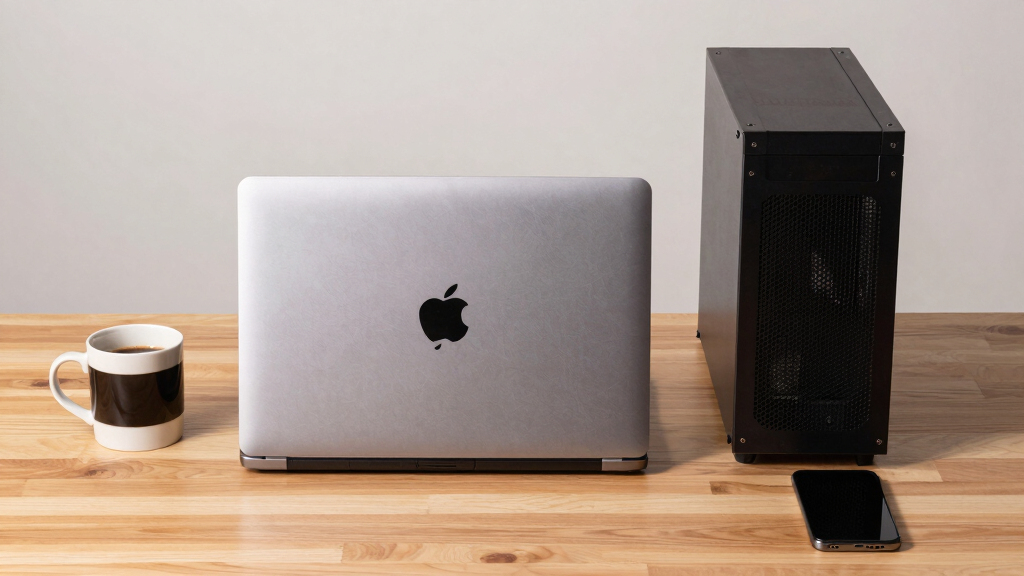
Mac vs GPU tower
for local LLMs.
What if you sidestep the heat entirely with a different kind of machine? A tower is a high-bandwidth furnace you spend five levers quieting. Apple Silicon is near-silent by design — but asks for different tradeoffs. Match your priority in Part 2.
Put the loud, hot machine where its noise doesn’t matter, and the quiet one where you do. SSH into the tower when you need raw power; let the Mac handle everything else, silently.
Impact of Hardware Choice on AI Work Environment
This comparison influences decisions for AI practitioners based on workload needs: those requiring high throughput for smaller models may prefer GPU towers despite their heat and noise, while users needing to run large models silently and efficiently may find Macs more suitable. The tradeoff impacts hardware costs, energy consumption, and workspace comfort—factors critical for long-term AI deployment and personal use.Popular right now

De'Longhi Magnifica Evo Fully Automatic Espresso Machine with Manual Milk Frother

KitchenAid Artisan Series 5-Quart Tilt-Head Stand Mixer, Dried Rose (KSM150PS)

Samsung 48-Inch S90H OLED 4K Smart TV (2026)
As an affiliate, we earn on qualifying purchases.
Evolution of Hardware for Local AI Inference
Historically, GPU towers have been the standard for local AI inference due to their high bandwidth and native CUDA ecosystem, supporting fine-tuning and training. Recent advances in Apple Silicon, with larger unified memory pools and improved MLX frameworks, have begun to challenge this dominance, especially for large models that exceed GPU VRAM. The debate reflects broader shifts in AI hardware design, balancing raw performance against thermal and acoustic comfort. The current discussion is fueled by ongoing hardware releases and user reports comparing these architectures in real-world scenarios."The heat-and-noise dimension is one of the sharpest differences between Mac Silicon and GPU towers, and it fundamentally influences how users choose their AI hardware."
— Thorsten Meyer
Unresolved Questions About Performance and Scalability
It is not yet clear how future GPU architectures or Apple Silicon updates will shift these tradeoffs, especially regarding multi-GPU scaling, software ecosystem maturity, and long-term performance for increasingly large models. The exact real-world performance differences across diverse workloads remain to be fully quantified, and user experiences vary based on setup and thermal management practices.
Upcoming Hardware Developments and User Testing
Expect ongoing hardware releases from NVIDIA and Apple, potentially altering the performance and thermal landscape. Further comparative testing and user reports will clarify how these systems perform under different workloads, guiding hardware choices for AI practitioners. Additionally, software ecosystem improvements, especially around multi-GPU scaling and model support, will influence future hardware preferences.
Key Questions
Can a Mac run the same models as a GPU tower?
Large models exceeding GPU VRAM, such as 70B+ parameter models, can run on Macs with unified memory, but typically at slower inference speeds.
How much noise does a GPU tower produce?
GPU towers can produce significant noise, especially under load, requiring active cooling and noise mitigation efforts.
Is the heat from GPU towers a concern for workspace comfort?
Yes, high power draw results in substantial heat, which must be managed with cooling solutions, making thermal considerations critical for workspace comfort.
Will future Apple Silicon chips improve performance for large models?
Potential upgrades could increase memory bandwidth and capacity, but current designs prioritize efficiency and silence over raw throughput for large models.
Which hardware is better for training models?
GPU towers currently offer superior native ecosystems and scaling for training, but Macs are more suited for inference of large models that fit in unified memory.
Source: ThorstenMeyerAI.com